

As part of our ongoing series on building a fully local AI setup — from hardware decisions to first results — this post focuses on the end-to-end system we now use in practice.
Let me write about the evolution of our setup.
First off, many people just run everything directly from the terminal. We found that using Docker containers instead has several advantages. It provides a convenient, self-documenting way to build and run each tool, define the network between containers, and automate processes around them.
We used llama.cpp for hosting the model, which was initially gpt-oss-120B. We tested lots of different models, and many failed on subjective quality against gpt-oss-120B, even models released significantly later.
For the UI, we used the web-based OpenWebUI, which is a very flexible, though not extremely intuitive UI. It is the right tool if you want to play around with all sorts of bells and whistles around LLMs, but the learning curve is non-trivial. If you want an easy plug-and-play experience, you get that with LMStudio. Its usage is remarkably straightforward: you can simply run it even on a Windows machine or a MacBook Pro.
By the way, a MacBook Pro with a larger amount of memory is surprisingly good at running LLMs. Of course it is not as powerful as a strong GPU, but the large amount of unified memory available there is very useful for running relatively larger models.
On the other hand, using OpenWebUI and Tailscale for VPN, it was relatively straightforward to make the model running on the big desktop at home accessible from our laptops and phones, which is quite cool.
A basic limitation that you quickly find when hosting your own LLM is that the training cutoff date cuts a lot deeper than usual, since it does not have access to the Internet. For example, it did not believe me that it was not GPT-4 hosted by OpenAI, but gpt-oss-120B hosted on my own machine.
So we wanted to give it web access. For that we set up a container with SearXNG, which provides Internet search capability in a relatively straightforward and convenient manner. The key to the setup is to go to Workspace ➜ Tools and add a new tool that exposes web search and web fetch functionality. There are even multiple solutions already available which you can download.
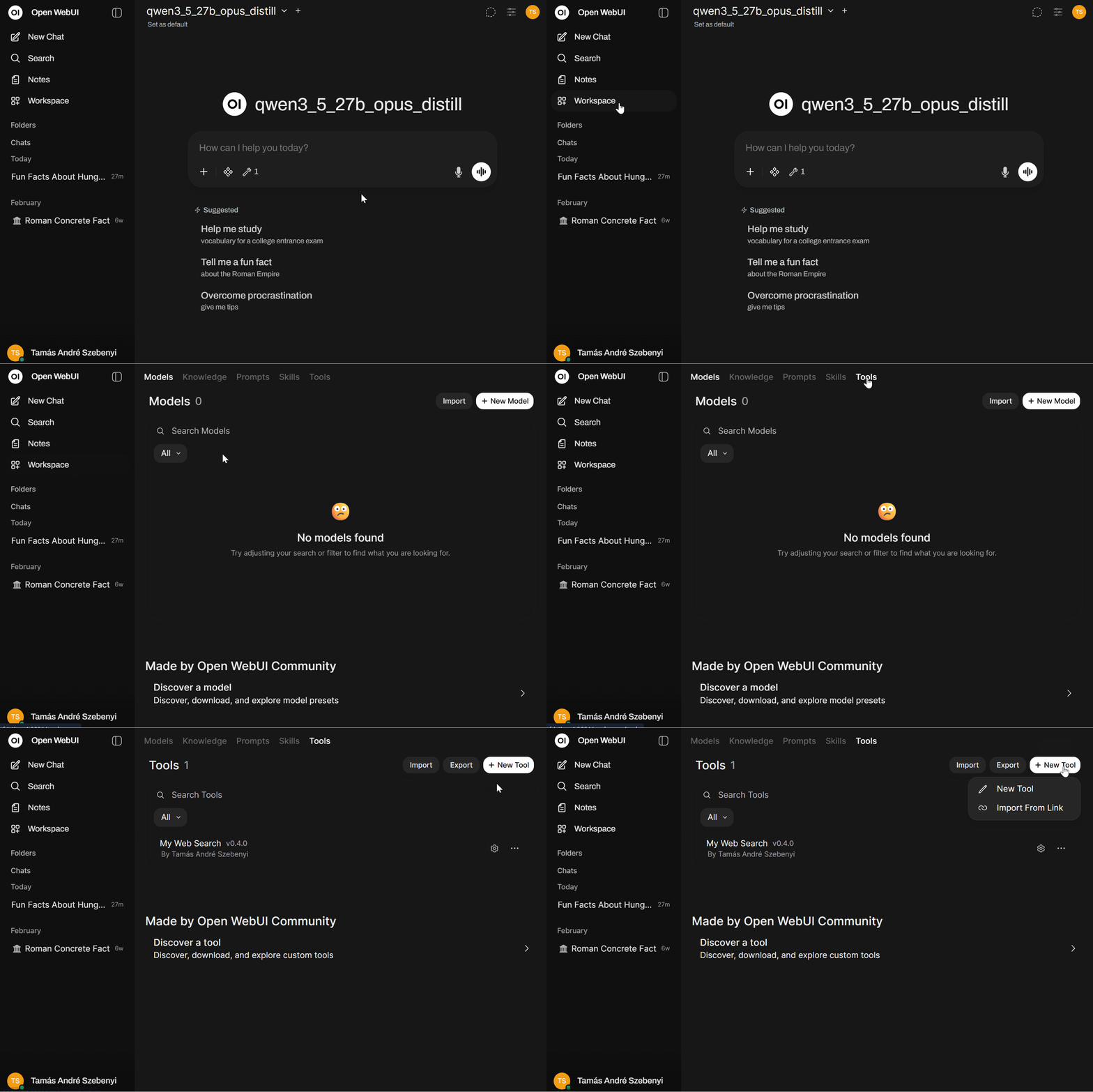
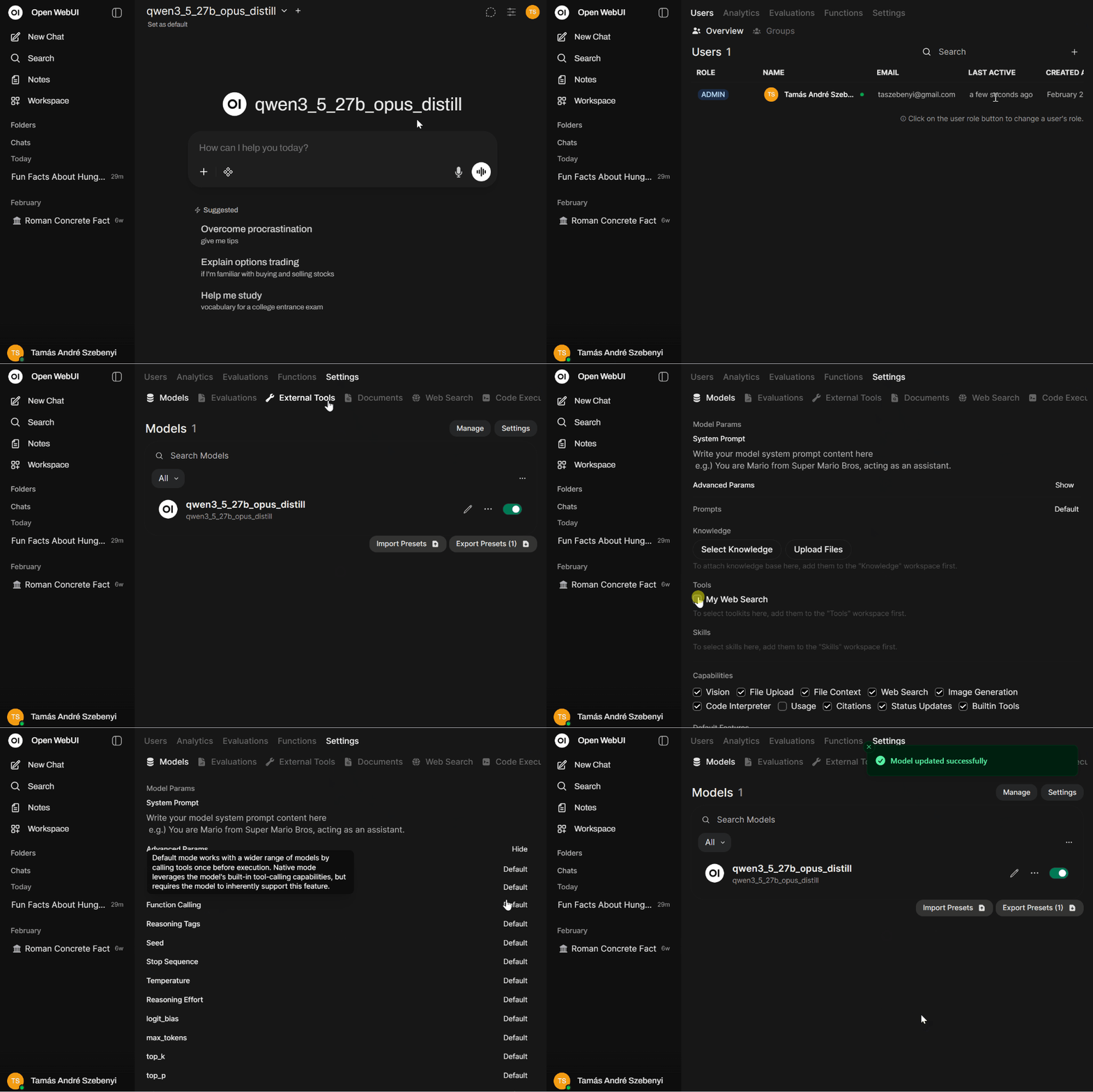
We took such a solution and modified it slightly. The key point is that certain tools only do a single web search, add it to the context, and then call the LLM. This is suboptimal. It is significantly more powerful to enable native function calling and thereby give the LLM the capability to decide freely about when and how many times it calls those tools. To enable the tool with native function calling, under Admin Panel ➜ Settings ➜ Models ➜ <specific model> do the following: 1) enable the tool itself by marking the checkbox beside its name under Tools; and 2) under Advanced Params set Function Calling to Native.
Once this is done, you can test the web search capability with a hard analysis problem that definitely requires multiple web accesses for a good result. My go-to question for this kind of test is asking whether the frequency of "quick bathroom break" has increased in Lex Fridman's podcasts recently. Some models get into infinite loops researching this, making dozens of tool calls and never arriving at a result. gpt-oss-120B does a relatively good job if we set a good system prompt in OpenWebUI.
My personal favorite currently is the Qwen3.5-27B model, specifically an Opus-distilled variant of it, which has some distilled reasoning goodness added to it, taken from Claude Opus answers. This fits completely on the GPU, unlike gpt-oss-120B, and produces a convincing analysis of the situation very quickly, even without setting a system prompt.
Qwen3.5 is a great model, and several variants of it are worth the attention. The 35B MoE (Mixture of Experts) version also fits on our GPU completely and provides lightning fast results. The 27B dense model is slightly slower, but with this Opus distill variant we got some very nice results in Claude Code, so that's our current main workhorse model.
It is also worth noting that it is a multimodal model, meaning it can process images in addition to text. This works out of the box in both OpenWebUI and Claude Code without any additional setup.
In everyday use, the model is capable and responsive enough for most practical tasks. In our case, this setup is already replacing a meaningful portion of API-based usage for routine work.
The main trade-offs versus paid models are a higher hallucination rate, partially mitigated by web search for factual queries, and a smaller — but still usable — context window (the Qwen models support up to ~262k tokens, and we can run them at that limit on our hardware without hitting VRAM constraints).
For example, when shown fictional FIFA-style cards, including one of my brother, it confidently identified them as real Hungarian players and even invented missing details. With web search enabled, it quickly corrected itself and recognized them as likely fan-made.
Where it tends to break is in multi-step reasoning and edge cases, where errors can still be subtle but consequential.
Outputs should still be treated with appropriate skepticism. This is a tool that can be relied on for acceleration, but not yet for unquestioned correctness.
Next time we will take a look at image generation.